Guide ix.Cloud API
Die offizielle ix.Cloud API Dokumentation ist unter dem folgenden Link https://portal.ixcloud.ch/api-documentation einsehbar.
Voraussetzungen
- Zugang zum ix.Cloud Portal und einen privilegierten Benutzer
- Personal Access Token (PAT)
Personal Access Token
Jeder Benutzer kann im ix.Cloud Portal in seinem Profil einen oder mehrere Personal Access Tokens erstellen.
Der Personal Access Token ist auf allen Subscriptions des aktiven ix.Cloud Tenants berechtigt.
Erstellen eines Personal Access Tokens
Um einen Personal Access Token zu erstellen sind folgende Schritte notwendig:
- ix.Cloud Profil öffnen (Link: https://portal.ixcloud.ch/profile)
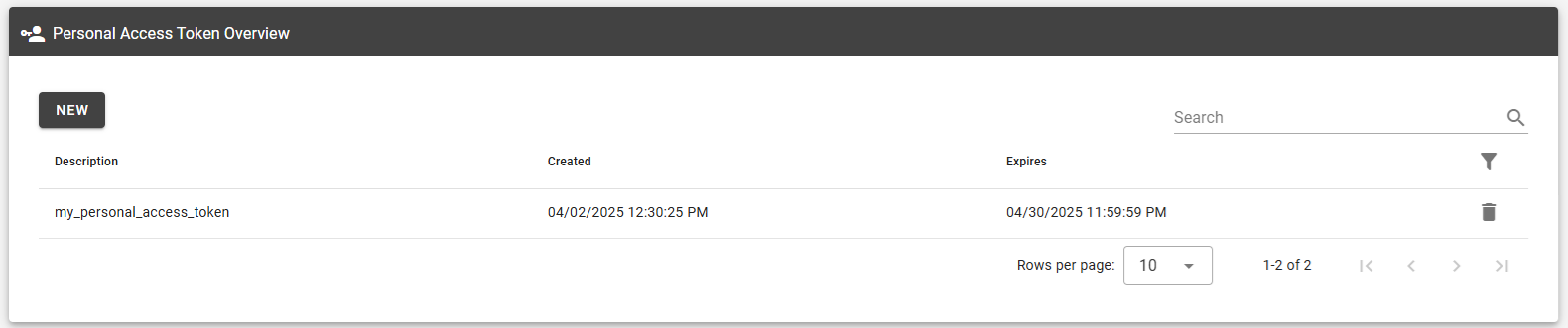
- Im Bereich Personal Access Token Overview auf New klicken
- Beschreibung und Ablaufdatum eintragen
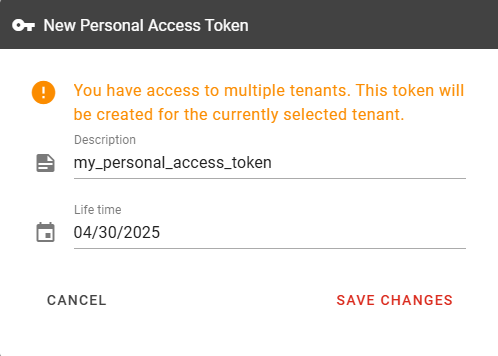
- Speichern
Löschen eines Personal Access Tokens
Personal Access Tokens können jederzeit über das ix.Cloud Profil gelöscht
werden.
Umgang mit Personal Access Tokens
Beim Personal Access Token handelt es sich um ein persönliches Token. Dieser sollte unter keinen Umständen mit Anderen geteilt werden!
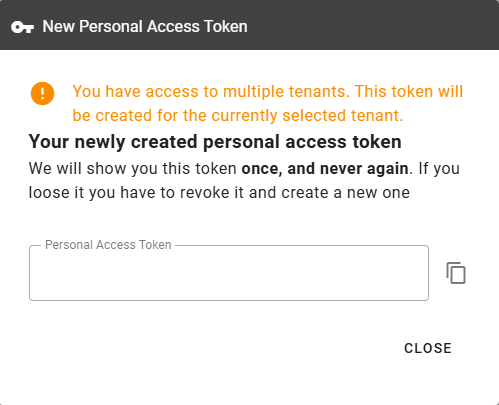
Auch ist der Token nur einmal nach der Erstellung ersichtlich. Personal Access Tokens sollten in einem Passwort-Safe gespeichert werden und unter keinen Umständen in Textdateien oder in einem Version control system (VCS).
Addon Resources
Create or update the Endpoint Detection and Response addon
Bash
#!/bin/bash

read -p "Enter Personal Access Token: " AccessToken
read -p "Enter the virtual machine name: " VmName
read -p "Enter the subscription ID of the vm's subscription (https://portal.ixcloud.ch/subscriptions): " SubscriptionId

JsonBody=$(cat <<EOF
{
  "resources": [
    {
      "name": "VirtualMachine.${VmName}.EDR",
      "type": "ix.addon/edr",
      "apiVersion": "v1",
      "dependsOn": [],
      "properties": {
        "parentResourceName": "${VmName}",
        "parentResourceType": "VirtualMachine"
      }
    }
  ]
}
EOF
)

curl -X PUT "https://api.ixcloud.ch/services/deployment/v1/subscriptions/${SubscriptionId}" \
  -H "Authorization: Bearer ${AccessToken}" \
  -H "Content-Type: application/json" \
  -d "$JsonBody"
PowerShell
$AccessToken = Read-Host "Enter Personal Access Token"
$VmName = Read-Host "Enter the virtual machine name"
$SubscriptionId = Read-Host "Enter the subscription ID of the vm's subscription (https://portal.ixcloud.ch/subscriptions)"

$Body = @{
    resources = @(
        @{
            name       = "VirtualMachine.$VmName.EDR"
            type       = "ix.addon/edr"
            apiVersion = "v1"
            dependsOn  = @()
            properties = @{
                parentResourceName = $VmName
                parentResourceType = "VirtualMachine"
            }
        }
    )
} | ConvertTo-Json -Compress -Depth 5

$Arguments = @{
    Uri         = "https://api.ixcloud.ch/services/deployment/v1/subscriptions/$SubscriptionId"
    Method      = "PUT"
    ContentType = "application/json"
    Headers     = @{"Authorization" = "Bearer $AccessToken" }
    Body        = $Body
}

Invoke-WebRequest @Arguments
Create or update the System Update addon
Bash
#!/bin/bash

read -p "Enter Personal Access Token: " AccessToken
read -p "Enter the virtual machine name: " VmName
read -p "Enter the subscription ID of the vm's subscription (https://portal.ixcloud.ch/subscriptions): " SubscriptionId

read -p "Enter the patch week (Second,Third,Fourth): " PatchWeek
read -p "Enter the patch week (Monday,Tuesday...): " PatchDay
read -p "Enter at which hour of the day the patching should start (0,1,2,3...): " MaintenanceWindowStartHour

JsonBody=$(cat <<EOF
{
  "resources": [
    {
      "name": "VirtualMachine.${VmName}.SystemUpdate",
      "type": "ix.addon/systemupdate",
      "apiVersion": "v1",
      "dependsOn": [],
      "properties": {
        "patchWeek": "${PatchWeek}",
        "patchDay": "${PatchDay}",
        "maintenanceWindowStartHour": "${MaintenanceWindowStartHour}",
        "disableAutomaticPatch": false,
        "noAutomaticPatchJustification": null,
        "parentResourceName": "${VmName}",
        "parentResourceType": "VirtualMachine"
      }
    }
  ]
}
EOF
)

curl -X PUT "https://api.ixcloud.ch/services/deployment/v1/subscriptions/${SubscriptionId}" \
  -H "Authorization: Bearer ${AccessToken}" \
  -H "Content-Type: application/json" \
  -d "$JsonBody"
PowerShell
$AccessToken = Read-Host "Enter Personal Access Token"
$VmName = Read-Host "Enter the virtual machine name"
$SubscriptionId = Read-Host "Enter the subscription ID of the vm's subscription (https://portal.ixcloud.ch/subscriptions)"

$PatchWeek = Read-Host "Enter the patch week (Second,Third,Fourth)"
$PatchDay = Read-Host "Enter the patch week (Monday,Tuesday...)"
$MaintenanceWindowStartHour = Read-Host "Enter at which hour of the day the patching should start (0,1,2,3...)"

$Body = @{
    resources = @(
        @{
            name       = "VirtualMachine.$VmName.SystemUpdate"
            type       = "ix.addon/systemupdate"
            apiVersion = "v1"
            dependsOn  = @()
            properties = @{
                patchWeek                     = $PatchWeek
                patchDay                      = $PatchDay
                maintenanceWindowStartHour    = $MaintenanceWindowStartHour
                disableAutomaticPatch         = $false
                noAutomaticPatchJustification = $null
                parentResourceType            = "VirtualMachine"
                parentResourceName            = $VmName
            }
        }
    )
} | ConvertTo-Json -Compress -Depth 5

$Arguments = @{
    Uri         = "https://api.ixcloud.ch/services/deployment/v1/subscriptions/$SubscriptionId"
    Method      = "PUT"
    ContentType = "application/json"
    Headers     = @{"Authorization" = "Bearer $AccessToken" }
    Body        = $Body
}

Invoke-WebRequest @Arguments