Guide ix.Cloud API
The official ix.Cloud API documentation can be found at the following link https://portal.ixcloud.ch/api-documentation
Prerequisites
- Access to the ix.Cloud Portal and a privileged user
- Personal Access Token (PAT)
Personal Access Token
Every user can create one or more Personal Access Tokens in the ix.Cloud Portal in their profile.
The Personal Access Token is authorized for all subscriptions of the active ix.Cloud tenant.
Creating a Personal Access Token
To create a Personal Access Token, the following steps are necessary:
- Open ix.Cloud profile (Link: https://portal.ixcloud.ch/profile)
- In the Personal Access Token Overview section, click New
- Enter Description and Expiration date
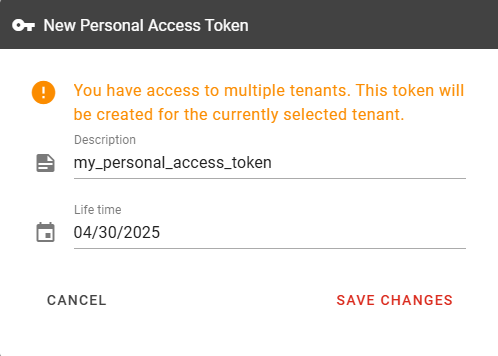
- Save
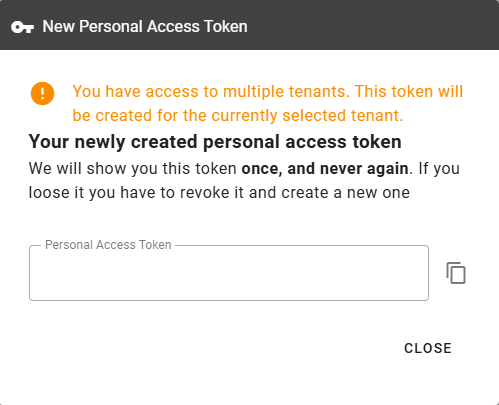
Deleting a Personal Access Token
Personal Access Tokens can be deleted at any time via the ix.Cloud profile.
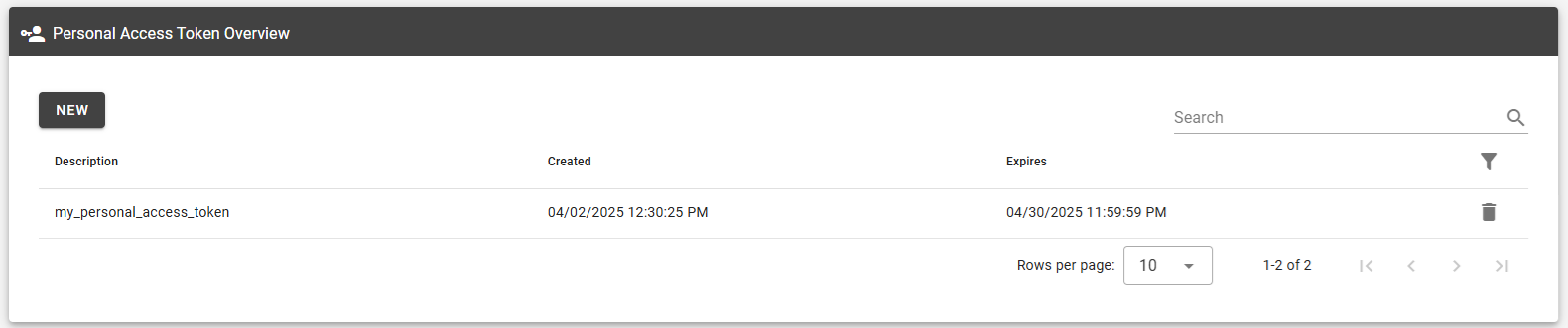
Handling Personal Access Tokens
The Personal Access Token is a personal token. It should not be shared with others under any circumstances!
Also, the token is only visible once after creation. Personal Access Tokens should be stored in a password manager and under no circumstances in text files or in a version control system (VCS).
Addon Resources
Create or update the Endpoint Detection and Response addon
Bash
#!/bin/bash

read -p "Enter Personal Access Token: " AccessToken
read -p "Enter the virtual machine name: " VmName
read -p "Enter the subscription ID of the vm's subscription (https://portal.ixcloud.ch/subscriptions): " SubscriptionId

JsonBody=$(cat <<EOF
{
  "resources": [
    {
      "name": "VirtualMachine.${VmName}.EDR",
      "type": "ix.addon/edr",
      "apiVersion": "v1",
      "dependsOn": [],
      "properties": {
        "parentResourceName": "${VmName}",
        "parentResourceType": "VirtualMachine"
      }
    }
  ]
}
EOF
)

curl -X PUT "https://api.ixcloud.ch/services/deployment/v1/subscriptions/${SubscriptionId}" \
  -H "Authorization: Bearer ${AccessToken}" \
  -H "Content-Type: application/json" \
  -d "$JsonBody"
PowerShell
$AccessToken = Read-Host "Enter Personal Access Token"
$VmName = Read-Host "Enter the virtual machine name"
$SubscriptionId = Read-Host "Enter the subscription ID of the vm's subscription (https://portal.ixcloud.ch/subscriptions)"

$Body = @{
    resources = @(
        @{
            name       = "VirtualMachine.$VmName.EDR"
            type       = "ix.addon/edr"
            apiVersion = "v1"
            dependsOn  = @()
            properties = @{
                parentResourceName = $VmName
                parentResourceType = "VirtualMachine"
            }
        }
    )
} | ConvertTo-Json -Compress -Depth 5

$Arguments = @{
    Uri         = "https://api.ixcloud.ch/services/deployment/v1/subscriptions/$SubscriptionId"
    Method      = "PUT"
    ContentType = "application/json"
    Headers     = @{"Authorization" = "Bearer $AccessToken" }
    Body        = $Body
}

Invoke-WebRequest @Arguments
Create or update the System Update addon
Bash
#!/bin/bash

read -p "Enter Personal Access Token: " AccessToken
read -p "Enter the virtual machine name: " VmName
read -p "Enter the subscription ID of the vm's subscription (https://portal.ixcloud.ch/subscriptions): " SubscriptionId

read -p "Enter the patch week (Second,Third,Fourth): " PatchWeek
read -p "Enter the patch week (Monday,Tuesday...): " PatchDay
read -p "Enter at which hour of the day the patching should start (0,1,2,3...): " MaintenanceWindowStartHour

JsonBody=$(cat <<EOF
{
  "resources": [
    {
      "name": "VirtualMachine.${VmName}.SystemUpdate",
      "type": "ix.addon/systemupdate",
      "apiVersion": "v1",
      "dependsOn": [],
      "properties": {
        "patchWeek": "${PatchWeek}",
        "patchDay": "${PatchDay}",
        "maintenanceWindowStartHour": "${MaintenanceWindowStartHour}",
        "disableAutomaticPatch": false,
        "noAutomaticPatchJustification": null,
        "parentResourceName": "${VmName}",
        "parentResourceType": "VirtualMachine"
      }
    }
  ]
}
EOF
)

curl -X PUT "https://api.ixcloud.ch/services/deployment/v1/subscriptions/${SubscriptionId}" \
  -H "Authorization: Bearer ${AccessToken}" \
  -H "Content-Type: application/json" \
  -d "$JsonBody"
PowerShell
$AccessToken = Read-Host "Enter Personal Access Token"
$VmName = Read-Host "Enter the virtual machine name"
$SubscriptionId = Read-Host "Enter the subscription ID of the vm's subscription (https://portal.ixcloud.ch/subscriptions)"

$PatchWeek = Read-Host "Enter the patch week (Second,Third,Fourth)"
$PatchDay = Read-Host "Enter the patch week (Monday,Tuesday...)"
$MaintenanceWindowStartHour = Read-Host "Enter at which hour of the day the patching should start (0,1,2,3...)"

$Body = @{
    resources = @(
        @{
            name       = "VirtualMachine.$VmName.SystemUpdate"
            type       = "ix.addon/systemupdate"
            apiVersion = "v1"
            dependsOn  = @()
            properties = @{
                patchWeek                     = $PatchWeek
                patchDay                      = $PatchDay
                maintenanceWindowStartHour    = $MaintenanceWindowStartHour
                disableAutomaticPatch         = $false
                noAutomaticPatchJustification = $null
                parentResourceType            = "VirtualMachine"
                parentResourceName            = $VmName
            }
        }
    )
} | ConvertTo-Json -Compress -Depth 5

$Arguments = @{
    Uri         = "https://api.ixcloud.ch/services/deployment/v1/subscriptions/$SubscriptionId"
    Method      = "PUT"
    ContentType = "application/json"
    Headers     = @{"Authorization" = "Bearer $AccessToken" }
    Body        = $Body
}

Invoke-WebRequest @Arguments