MSSQL PaaS gMSA Definition
A dedicated gMSA is created for each service on a VM. This can only be used on the Windows instance for which the account was created. These accounts are created by the Automation User «ix_dbautomation-w». When an instance is deleted, the accounts are removed from AD again. The gMSAs are stored in the OU of the MSSQL Service in the AD in the associated OU (Users).
Logon As a Service
To authorize the gMSA for Logon as a Service, a dedicated GPO for Logon as a Service is created in the OU of the MS-SQL Server. Additionally, an AD group is created in the OU of the MS-SQL Server and linked to the GPO, so that each member of the AD group receives the permission Logon as a Service on all computers within the OU (Computers) of the MS-SQL Service.
Definition Group Managed Service Accounts
Group Managed Service Accounts / Managed Service Accounts / Service Accounts
Because the samAccountName has a maximum length of 20 or 15 characters, the name of the object can be renamed after creation according to requirements (the attribute CN has no such restriction)
gMSA > MSA > SA
Group Managed Service Accounts (gMSA) should always be preferred over a "classic" Service Account when possible. Unfortunately, there are applications and services that cannot handle this account type. In this case, the use of a gMSA can of course be avoided. Experience shows that many applications work with a gMSA even if this is not explicitly documented or described. A verification is therefore usually desirable. gMSAs are by default always created in the "Managed Service Accounts" container. This is always located in the Root Domain Naming Context. The gMSA objects should always be moved to the respective Service OU.
Group Managed Service Accounts vs. Managed Service Accounts
Managed Service Accounts were introduced with Windows Server 2008 R2 and further developed into Group Managed Service Accounts with Windows Server 2012. The use of Managed Service Accounts is therefore only appropriate in domains that have not yet been updated to the Server 2012 AD schema and accordingly do not have a Domain Controller with Windows Server 2012 or newer.
Group Managed Service Accounts vs. Service Accounts
gMSA accounts are derived from the object type of the computer object. This means that when using a gMSA, like a computer account, the samAccountName ends with a "$".
The same restrictions are also applied, i.e. the maximum length of the samAccountName of the gMSA is limited to 15 characters.
Composition
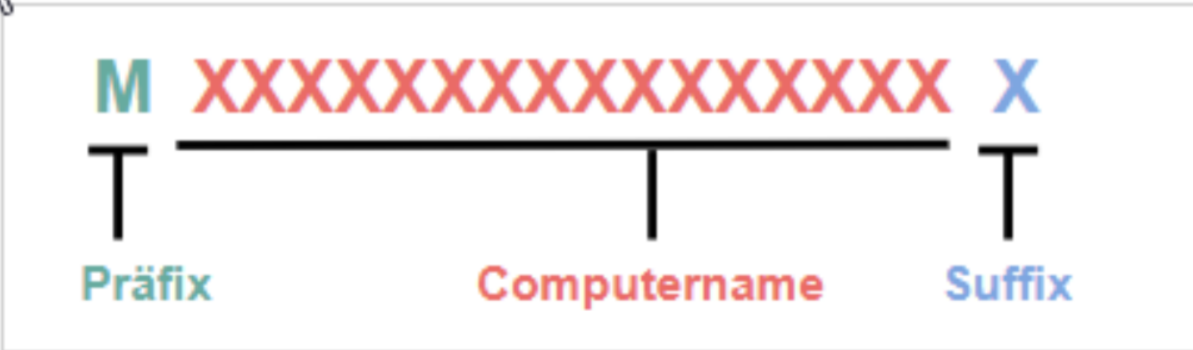
| Prefix | Suffix | Main Part | Example |
|---|---|---|---|
| m |
S: SQL Service I: Integration Service D: Analysis Service (MultiDim) T: Analysis Service (Tabular Model) R: Reporting Service P: Polybase Service M: Monitoring U: Audit H: Housekeeping B: Backup C: Cluster |
Full computer name → combined max. 15 characters |
Service: MSSQL m-IXI-SQL0001-a |