AnyCloudK8s
AnyCloudK8s is available as a self-service offering. Kubernetes clusters can be created, managed, and updated in the ix.Portal.
Prerequisites
- You have access to the desired cluster and/or the appropriate subscription in ix.Portal.
Features
- Create and delete a k8s cluster
- Cluster lifecycle
- Personalized Kubeconfig
- Expand and manage worker pools
Create a k8s Cluster
When creating a cluster, proceed as follows. Your cluster is always bound to a subscription.
A subscription is defined in the backend with a default quota. This can be adjusted via a generic change request.
CPU: 150
MEM: 500GB
When ordering a new cluster, provisioning can take up to 5 days.
After initial provisioning, all further service functions are fully automated, e.g., patching/updates as well as management of worker pools (expansion, modification, reduction).
Navigate on the left to Container Service -> AnyCloudK8s. You can see the existing clusters. To create a new cluster, click NEW.
Required Fields
- Cluster Name (max. 46 characters)
- SLA (Silver, Rhodium)
- Datacenter Location (St. Gallen, Gais)
- CNI Kind (cilium, canal) + CNI Version (according to list)
- Kubernetes Version (according to list)
- Cluster Size (according to list, details via ?)
- Worker Pool ID (Default: Default-[Number])
- Hardware Profile (according to list)
- Node Quantity (visible after selection of Cluster Size)
- Operating System (according to list)
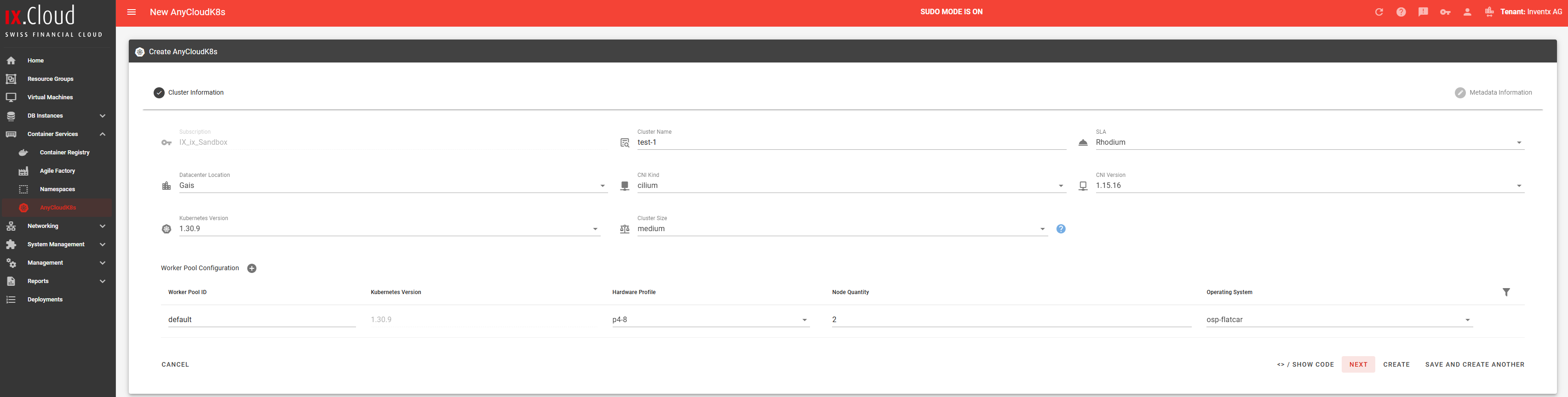
The remaining fields are metadata, as with the other services.
Cluster Lifecycle
In ix.Portal you can independently patch or upgrade clusters.
You must always update the Control Plane first - either to a higher patch version or to a new Kubernetes minor version. The worker pool can only be updated to the same version.
To update a cluster, edit it: Click on the three dots and select "Modify".

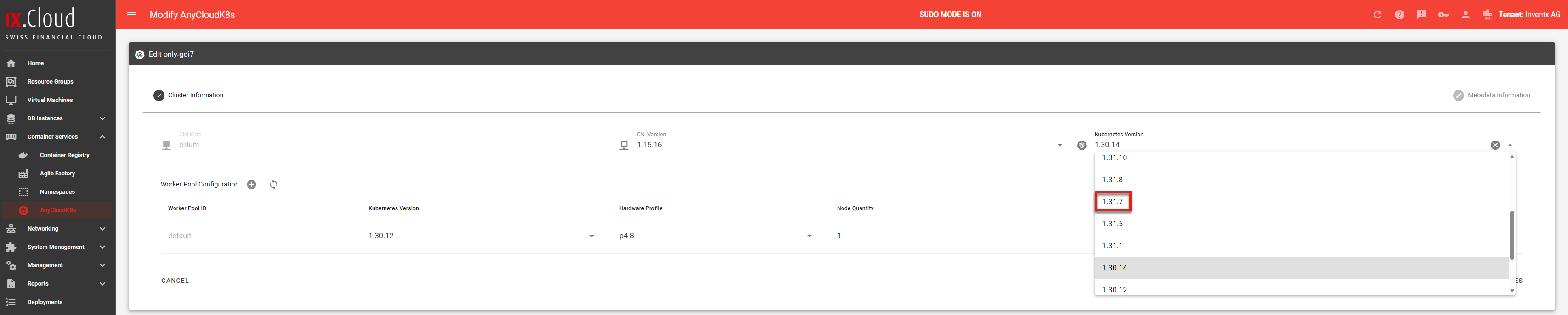
Update Control Plane
Select the Control Plane version and save. This will only update the Control Plane; you can update the worker pool separately afterward, once the Control Plane is finished.
Update Worker Pool
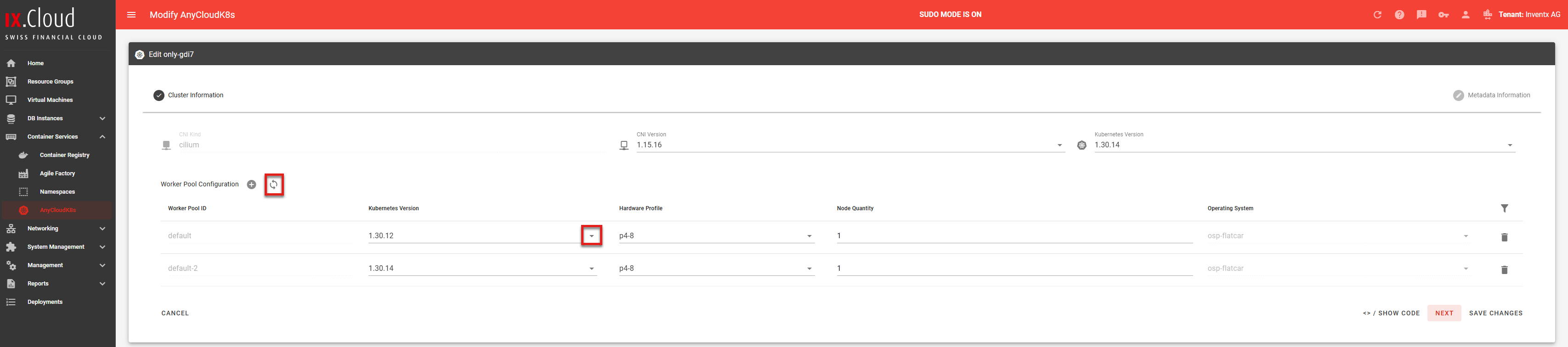
In the worker pool, you can either set all pools to a Kubernetes version or update individual pools to the Control Plane version (self-service via "Modify").
- All pools adopt: Click the two arrows at "Worker Pool Configuration".
- Individual pools: Select the Kubernetes version in the respective pool.
- Then save so the changes are applied.
Personalized Kubeconfig
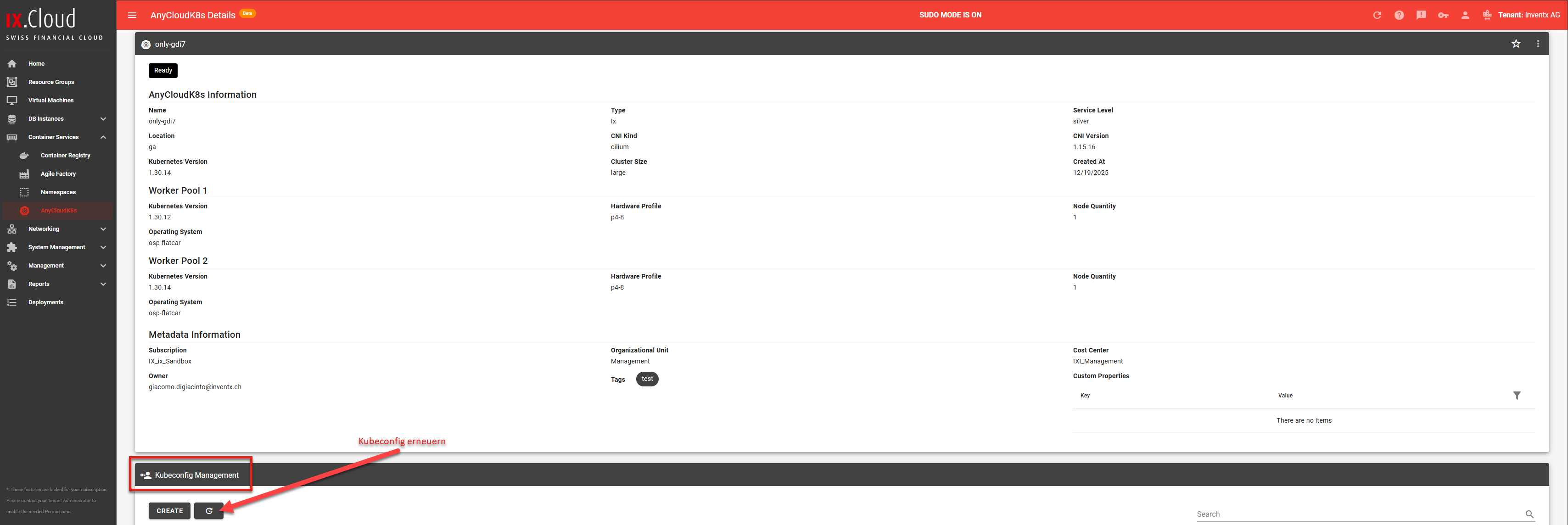
Each user has a personalized Kubeconfig available for direct cluster access. When creating "CREATE", ix.Portal automatically takes over the user data so the Kubeconfig is uniquely personalized.
After ordering, the Kubeconfig is displayed once. If it is lost, it can be renewed at any time.
Navigate on the left to Container Service -> AnyCloudK8s. You can see the existing clusters. To get a Kubeconfig, select the appropriate cluster.
Expand and Manage Worker Pools
Prerequisites
- You have access to the desired cluster in ix.Portal.
- You know the purpose of the pool
- For Taints: Your workloads must set appropriate tolerations if needed.
-
Navigation in ix.Portal
a) Open Container Service -> AnyCloudK8s
b) Select your cluster
c) Modify your cluster (click the 3 dots in the top right)
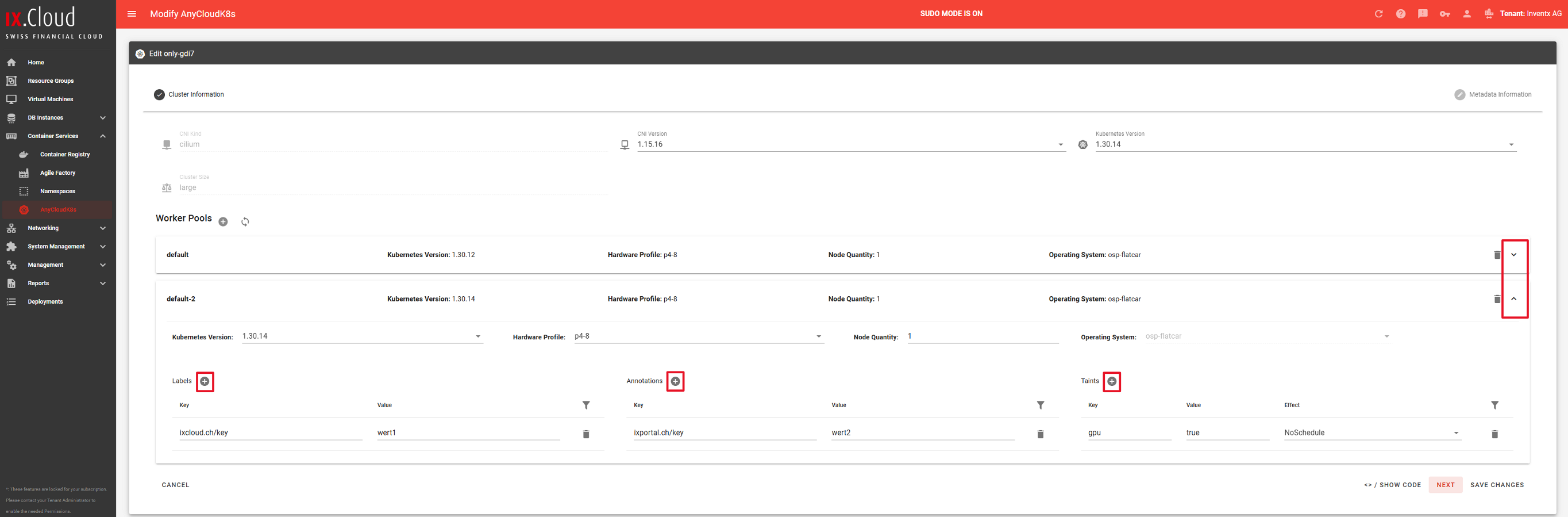
d) Click the down arrow for the desired pool
-
Modify Worker Pool
Typical adjustments include, for example, hardware profiles, Kubernetes version (if available), number of nodes, or additional pool options.
Procedure
a) Select pool -> Down arrow (expand)
b) Adjust desired values
c) Save
Wait until the change status is complete (job/task in the portal)
When making changes to the pool, a rolling behavior is triggered and can lead to service interruptions (depending on the application's resilience).
-
Scale Down Worker Pool
During scale-down, worker nodes are removed from the pool. Kubernetes attempts to cleanly migrate pods.
Procedure
a) Select pool -> Down arrow (expand)
b) Reduce Node Quantity (e.g., from 5 to 4)
c) Save
d) Monitor progress until the node is removed
Recommendations before scale-down:
-
Check whether sufficient free resources are available in the cluster.
-
Ensure that deployments are running with multiple replicas, or communicate a maintenance window.
-
For stateful workloads: consider PDBs, StatefulSets, and storage behavior.
-
Define Taints, Labels, or Annotations per Worker Pool
With Taints, you can control which pods are allowed to run on a pool. Without appropriate tolerations, pods will not be (or only limitedly) scheduled there.
importantExamples for Taints:
-
dedicated=team-a:NoSchedule (only pods with toleration are allowed)
-
gpu=true:NoSchedule (reserve GPU pool)
-
maintenance=true:NoExecute (pods are removed)
Procedure
a) Select pool -> Down arrow (expand)
b) In the Labels, Annotation, or Taints section, click the plus
c) Labels
-
Key (e.g., ixcloud.ch/key)
-
Value (e.g., value1)
d) Annotations
-
Key (e.g., ixportal.ch/key)
-
Value (e.g., value2)
e) Add Taint:
-
Key (e.g., gpu)
-
Value (e.g., true)
-
Effect: NoSchedule, PreferNoSchedule, or NoExecute
d) Save
-
Troubleshooting (brief)
- Pods remain Pending: Taint without appropriate toleration, insufficient resources, Node Selector/Affinity does not match.
- Scale-down fails: PDB blocks eviction, stateful/persistent pods cannot be migrated, insufficient free capacity.
- Unexpected distribution: Check Taints/Tolerations, Affinity/Anti-Affinity, Topology Spread Constraints.