Storage Services
The ix.Cloud "Storage Services" provide the ability to store data in Inventx's highly available data centers or expand a local data center with additional storage capacity.
| Service Name | Service Description |
|---|---|
| File Storage | Data storage for office documents, desktop profiles, and WORM archives. |
| Object Storage | Scalable object storage for large amounts of unstructured data |
File Storage
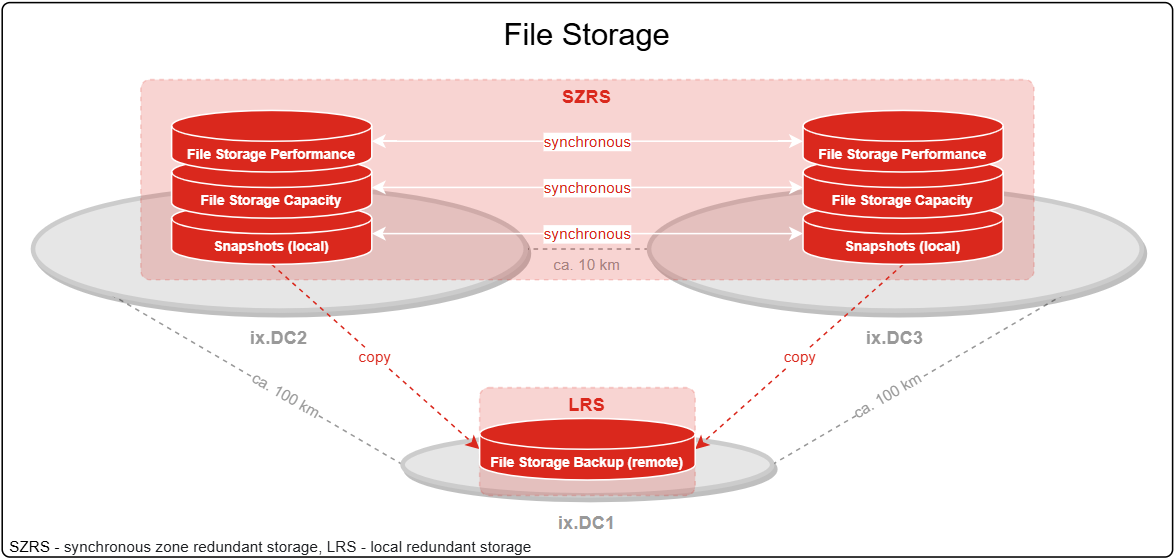
The File Storage Service provides managed file shares that can be accessed via industry-standard protocols (NFS or CIFS/SMB). Data on File Storage is permanently synchronized between Inventx data centers in Switzerland.
Orders and all changes to the File Storage Service must be requested via a "Generic Request".
Service Architecture
Service Scope
| Performance Features | |
|---|---|
| Redundancy and Replication | ◼ |
| XTS-AES 256-Bit Encryption | ◼ |
| AutoGrow & AutoShrink | ◼ |
| Access Protocols NFS / CIFS (SMB) | ◼ |
| Data Backup | ◼ |
| Data Recovery | ◼ |
| Customizable Tiering | ◼ |
| Antivirus Protection | ◻ |
| Ransomware Protection | ◻ |
| WORM (write-once-read-many) | ◻ |
Service Options
The File Storage Service has the following options explained below.
Redundancy and Replication
To achieve the highest possible data availability, primary data and backups (snapshots) are permanently replicated synchronously across two data centers (zone redundancy). Additionally, for disaster recovery purposes, a backup copy is created to a third data center.
XTS-AES 256-Bit Encryption
Data on File Storage is encrypted with XTS-AES 256-bit encryption (Encryption@Rest). This encryption algorithm is one of the most commonly used and simultaneously most secure methods for encrypting data on storage.
AutoGrow & AutoShrink
Volume expansion and reduction occurs dynamically, with billing based on daily measured data consumption.
Increases of more than 20% of total capacity according to the Consumption Report must be announced two months in advance.
Access Protocols NFS / CIFS (SMB)
Access to the folder share or data occurs via NFS or CIFS protocol.
With the NFS protocol, access is restricted based on the client IP address or DNS name, and with the CIFS protocol, access is granted and managed via the customer's Active Directory.
Multi-protocol access (NFS and CIFS) to a folder share is not supported.
Data Backup
Primary data is backed up via snapshot technology at regular intervals (hourly and daily) and replicated synchronously across two data centers. The daily snapshot is additionally copied to a third data center.
Data backup can be configured according to needs using the following four backup profiles:
- 40d Backup
- 200d Backup (Standard)
- 400d Backup
- No Backup
With the "No Backup" backup profile, no backup of primary data is created upon explicit request. The customer thus waives the possibility of data recovery.
The retention period for the backup profiles is set up according to the specifications below. If the "40d Backup", "200d Backup", or "400d Backup" option is selected during backup, immutable snapshots of the primary data are created regularly. This results in conditional ransomware protection, as previous backups can be accessed.
| Retention Period "40d Backup" |
Location | ||
|---|---|---|---|
| local (snapshot) | remote | ||
Interval |
hourly | 2 days | ⁃ |
| daily | 20 days | 40 days (with WORM 20 days) |
|
| Retention Period "200d Backup" |
Location | ||
|---|---|---|---|
| local (snapshot) | remote | ||
Interval |
hourly | 10 days | ⁃ |
| daily | 40 days | 200 days (with WORM 40 days) |
|
| Retention Period "400d Backup" |
Location | ||
|---|---|---|---|
| local (snapshot) | remote | ||
Interval |
hourly | 20 days | ⁃ |
| daily | 80 days | 400 days (with WORM 80 days) |
|
Data Recovery
Recovery of primary data is performed in self-service via the "Previous Versions" function in Windows File Explorer. Recovery from a remote backup must be requested via "Generic Request".
If the "No Backup" option is selected in the Backup Profile (see Data Backup), recovery of primary data is not possible.
Customizable Tiering
Customizable tiering makes it possible to move inactive data to a more cost-effective storage tier. The File Storage Service provides the following two storage tiers:
| Storage Tier | Throughput / Volume | IOPs / Volume |
|---|---|---|
| Performance | max. 200 MB/s | max. 5'000 |
| Capacity | max. 50 MB/s | max. 1'000 |
The KPIs "Throughput" and "IOPs" mentioned above are to be considered as guideline values and are fundamentally dependent on file size and the protocol used. For the Performance Tier, response times of an average of <5ms are to be expected (measured over 4 hours on the storage controller).
All data initially remains on the Performance Tier and can then be moved to the Capacity Tier using "Auto Tiering" based on rules and automatically. The following profiles are available:
- No Tiering (data remains on the Performance Tier)
- Auto Tiering (inactive data is moved to the Capacity Tier after 40 days)
Antivirus Protection
CIFS (SMB) file shares can optionally be scanned with an antivirus scanner. Known file extensions of ransomware are additionally blocked.
For the Antivirus Protection option, two VMs with antivirus software are installed in the customer's network. Depending on the load on the file shares, more than two VMs may be required.
Ransomware Protection
As an option, AI-based anomaly detection and pattern recognition with emergency snapshot creation can be selected. Thanks to this option, early detection of ransomware can be ensured. See attached graphic for 2-layer defense.
The scope of functions also includes the possibility of configurable user lockout, the possibility of differential recovery, and other analysis options.
Additionally, individual patterns and response policies can be defined. The configuration of honeypots is also available.
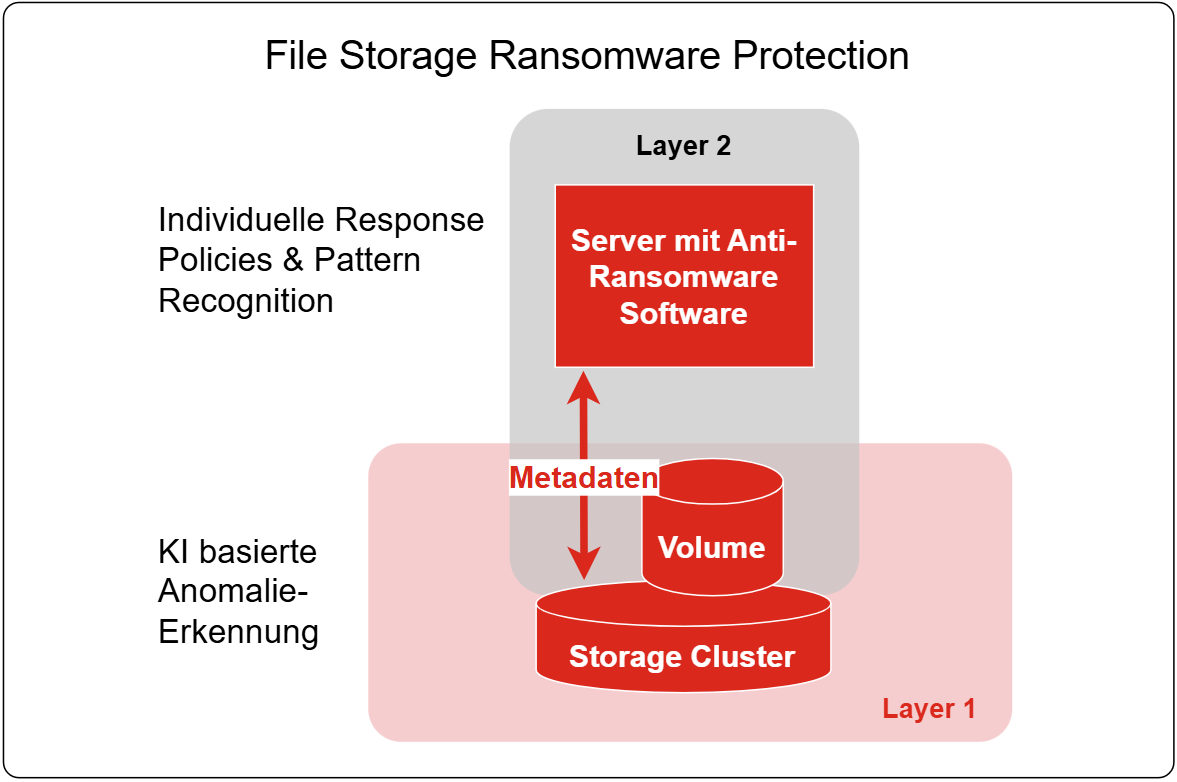
For the Ransomware Protection option, a VM with the appropriate software is installed in the customer's network. Depending on the load on the file shares, more than one VM may be required. The Ransomware Protection option is implemented for the customer in collaboration with ix.CRC. Technically also possible with WORM volumes. Since WORM volumes are usually used in connection with archive applications, a more detailed analysis of the actions and their effects must be clarified. This can be implemented together with the customer upon request.
This option can only be used with non-WORM volumes, as WORM data is already stored immutably.
WORM (write-once-read-many)
To prevent files from being deleted, modified, or renamed, the WORM option can be selected if needed.
Before initial setup, the dependencies and requirements of an archival solution must be checked.
Object Storage
The Object Storage of ix.Cloud is an S3-compatible, scalable, and geo-redundant data store. Data is grouped in so-called vaults. This allows storage objects to be retrieved efficiently without knowing the physical location of an object - complex directory structures are eliminated. During data upload, data is automatically broken down into individual pieces using the Erasure Code method, extended with redundant information, and stored in physically different locations in the storage system. This allows corrupted or lost data to be reconstructed using information still available elsewhere.
Object Storage is ideal for storing large amounts of unstructured data, making it versatile in its applications: e.g., file storage, media, web content, data archiving, backup and restore.
Service Architecture

Service Scope
| Performance Feature | |
|---|---|
| Initial Setup | ◻ |
| Access and Authentication | ◼ |
| Encryption | ◼ |
| Storage Management | ◼ |
| Malware Protection | ◻ |
Service Options
Orders and all changes must be requested via a "Generic Request".
Access and Authentication
Logical separation and administration integrity is managed via an individual vault. After initial setup, access is provided via S3-API over HTTPS using username (Access Key ID) and password (Secret Access Key).
Encryption
Data transmission (upload and download) is encrypted with TLS (formerly SSL). All data on the storage system is stored using the Secure-Slice algorithm (256 bit), with the storage application implementing data encryption during the storage process.
Storage Management
Storage management of ix.Cloud Object Storage is based on AutoGrow and AutoShrink respectively. Consequently, no explicit storage size is reserved per customer. However, optionally per customer during initial setup or subsequently via "Generic Request", a maximum storage size per vault can be configured, with capacity management of such vaults being the customer's own responsibility. Billing is done monthly based on daily measured data consumption.