Database Services
With "Database Services", customers can store and manage their business data in databases based on different database technologies and service models.
| Service Name | Service Short Description |
|---|---|
| Managed xSQL-Instance | An MSSQL or MariaDB instance preconfigured and managed by Inventx with optional database operations. |
| Managed noSQL-Instance | A noSQL instance preconfigured and managed by Inventx. |
Managed xSQL-Instance
The "Managed xSQL-Instance" service is based on the Virtual Machine service. In addition to the VM, Inventx installs, configures, and operates a SQL Server and SQL instance according to manufacturer specifications and Inventx best practices.
As an optional addition to this service, Inventx can take over database management.
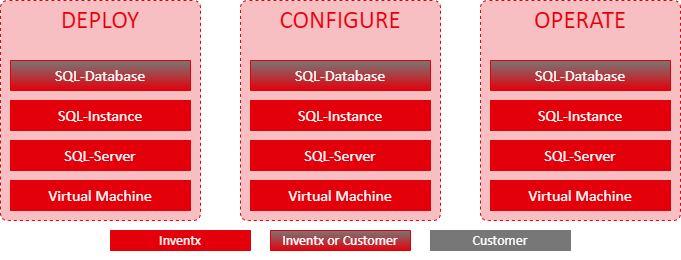
Service Architecture
See Service Architecture from the Virtual Machine service.
Service Scope
| Feature | Description |
|---|---|
| Licensing | See Licensing |
| Permissions | The customer receives no administrative rights on the instance. The customer is authorized as DBO (Database Owner) on individual databases. |
| Database Management | The customer can create databases within the database instance and must operate them themselves. Inventx does not provide maintenance services for such databases. |
| Database Backup (T-Log) | Database Backup |
| Database Restore | Database Restore |
| Database Clone | Database Clone |
| VM ON/OFF | For smooth operation of this service by Inventx, the customer must not turn the VM on and off. |
| Authentication | MS-SQL: Authentication is performed via Active Directory (NTLM or Kerberos). Authentication via SQL user must be requested as a Security Exception. PostgreSQL, Mariadb: Authentication is performed via SQL user. |
PaaS MSSQL Instance:
For security and operational reasons, the MSSQL Agent for any automations is not available.
Service Options
As part of the Managed xSQL-Instance service, customers have access to several technologies with specific additional features as follows:
Licensing
Inventx covers the licensing of the virtual server's operating system in this service (see Virtual Machine). For database server licensing, the following applies:
| Licensing Responsibility | Inventx | Customer |
|---|---|---|
| Operating system virtual server | ◼ | ⁃ |
| Microsoft SQL Server | ⁃ | ◼ |
| MariaDB Server | ◼ | ⁃ |
| PostgreSQL Server | ⁃ | ⁃ |
- Optionally and by agreement between customer, Inventx, and Microsoft, "license mobility programs" are possible. These must be worked out individually between the parties.
- When using more than 16 CPUs or more than 128 GB RAM, Microsoft SQL Enterprise Edition is mandatory.
Hardware Types and Hardware Profiles
All hardware profiles of the "Standard" hardware type according to the Virtual Machine service are available for selection.
The hardware profiles of the "Highclock" and "GPU" hardware types are not available.
Database Technologies
The following database technologies are available to the customer with this service:
| Database Technology | Community | Developer | Standard | Enterprise |
|---|---|---|---|---|
| Microsoft SQL Server 2019 | ◼ | ◼ | ◼ | |
| Microsoft SQL Server 2022 | ◼ | ◼ | ◼ | |
| MariaDB 10.6 as Managed Service | ◼ | |||
| MariaDB 11.8 as Managed Service | ◼ | |||
| PostgreSQL 15.0 | ◼ | ◼ | ||
| PostgreSQL 16.0 | ◼ | ◼ | ||
| PostgreSQL 17.0 | ◼ | ◼ |
Database Backup
With the data backup service for databases (Database Backup), Inventx backs up the customer's databases for the purpose of restoring databases in the event of IT disaster, data loss, or data corruption.
MS-SQL
Databases are backed up via the Service Agent of the Backup Service; this agent service is registered with gMSA. The gMSA is generated separately for each PaaS instance and has the necessary permissions on the MS-SQL instance according to the manufacturer.
PostgreSQL, MariaDB, MongoDB
Databases are backed up to an NFS share of the Backup Service. The Backup Service triggers the backup functions of the database instance remotely via SSH. The backup is stored in a dedicated directory on the NFS share.
| Database Backup | MSSQL | MariaDB | PostgreSQL |
|---|---|---|---|
| Location | according to SLA | according to SLA | according to SLA |
| Interval | |||
| daily | daily | daily | |
| - | ⁃ | ⁃ | |
| every 15 min | - | - | |
| - | every 15 min | every 15 min | |
| Retention Period | |||
| ◼ | ◼ | ◼ | |
| ◼ | ◼ | ◼ | |
| ◼ | ◼ | ◼ | |
| ◼ | ◼ | ◼ | |
| On-Demand Backup | ◼ | ◼ | ◼ |
Database Restore
If databases are backed up (see Database Backup), they can be restored based on available backup copies via "Generic Request" as follows:
| Database Restore | MSSQL | MariaDB | PostgreSQL |
|---|---|---|---|
| Database Restore | The customer can have individual databases restored from the last full backup via "Generic Request" by Inventx. | ||
| Conditions | The database must be configured with transaction log and a valid backup retention period according to the "Database Backup Features" table so that point-in-time recovery can be implemented. | ||
Database Clone
A clone creates a copy of an existing database or a copy of individual database objects. Inventx provides the following variants, with clones being subject to a charge and must be ordered via "Standard Service Request".
| Database Clone | Scope | Description |
|---|---|---|
| Full | Complete DB copy | 1-to-1 copy of a database, where all database elements (schema and data) are copied. |
| Structure | DB copy without content | Essentially a 1-to-1 copy, but only with regard to the layout of a database. The database contents (data, jobs, procedures, etc.) are not copied in this procedure, only the tables. |
| Individual | Individual scope | Individual scope that is jointly specified:
|
Cloning requires two databases: a source DB and a target DB, which can have different names. The source DB is on an existing DB instance and must be backed up (active backup service). As a target DB, either a database on the DB instance of the source DB can be defined, or a database on a different DB instance, which must be operated in the same network zone as the source DB. During the cloning process, the target DB is not available.
Advanced Features
The following technology-specific additional functions are optionally available to the customer.
| Database Add-Ons Managed ServiceDatabase Add-Ons Managed Service | MSSQL | MariaDB | PostgreSQL |
|---|---|---|---|
| Always On / DB Clustering | ◻ | ⁃ | ◻ |
| Security Audit | ◻ | ⁃ | ◻ |
Database Management
As an optional managed service, Inventx takes over database management based on the service described here. The following service agreement applies:
| Feature | Description |
|---|---|
| Order Management | New databases must be ordered via "Standard Service Request". |
| Permission | If Inventx takes over operational responsibility for the databases, Inventx removes the customer's permissions on the xSQL instance. |
| Database Deployment | Before deploying a new database, Inventx performs a check to determine whether it can be operated on the existing database instance or whether a new database instance should be created. |
| Database Operations |
As part of regular operational responsibility, Inventx ensures the following services, whereby some services are charged separately (Change or Service Request):
|
| Extended Service Delivery | Additional work beyond database operations (e.g., performance analysis) can be performed by Inventx. However, the customer must order this individually via Change Request and it will be billed on a time and material basis. |
PostgreSQL HA Managed Service
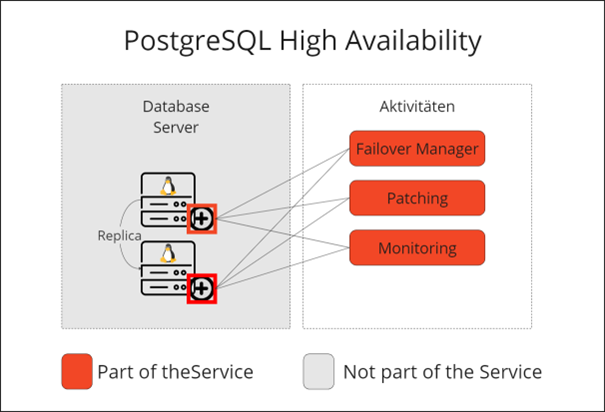
The PostgreSQL HA Cluster provides a PostgreSQL high availability solution as a Managed Service.
The PostgreSQL HA Cluster is deployed as 2 nodes (active, passive read-only) PostgreSQL Managed Service with virtual IP based on a licensed Failover Manager.
The cluster nodes are deployed and operated based on the PostgreSQL Managed Service.
The cluster must be ordered via Change Request.
Service Architecture
Service Scope
| PostgreSQL HA Cluster Node | Description |
|---|---|
| Primary | Active node for write operations and read operations. Virtual IP is assigned to this node. |
| Standby | Standby for failover case. Passive node for read operations |
Managed noSQL-Instance
The "Managed noSQL-Instance" service is based on the Virtual Machine service. The server binaries and the instance are installed, configured, and operated on the VM according to the manufacturer's specifications and Inventx best practices.
With increasing data growth and the requirement to handle data flexibly and scalably, additional database management systems (DBMS) have emerged alongside traditional relational database management systems (RDBMS) that fundamentally differ from RDBMS systems. NoSQL DBMS are characterized by their horizontal and vertical scalability. As a rule, NoSQL systems are schema-free, which makes them suitable for big data environments and the development of geo-redundant, highly available DBMS clusters. NoSQL systems can typically not only handle SQL syntax; they are also often capable of using a variety of different and application-specific syntax.
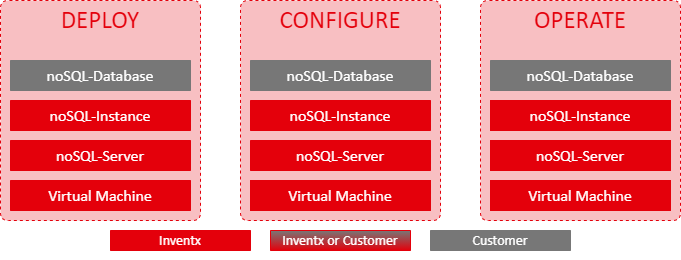
Service Architecture
See service architecture of the Virtual Machine service.
Service Provisioning
The host instance must be ordered as a «Managed OS» instance in the IX Portal.
The order for MongoDB Community must be requested via "Standard ServiceRequest".
Service Scope
| Performance feature | Performance description |
|---|---|
| Licensing | See Licensing |
| Permissions | The customer receives no administrative rights on the instance. They will be granted DBO (Database Owner) permissions on individual databases |
| Database Management | The customer can create databases within the database instance and must operate them themselves. Inventx provides no maintenance services for such databases. |
| Database Backup | See Database Backup |
| Database Restore | See Database Restore |
| Database Clone | See Database Clone |
| ON/OFF of the VM | For smooth operation of this service by Inventx, the customer must not switch the VM on and off. |
| Authentication | Authentication is performed via SQL user. |
Service Options
The following options are available as part of the Managed noSQL-Instance service.
Licensing
Inventx definitely covers the licensing of the operating system of the virtual server with this service (see Virtual Machine). For the licensing of the database server, the following applies:
| Licensing responsibility | Inventx | Customer |
|---|---|---|
| Operating system of virtual server | ◼ | ⁃ |
| MongoDB 7 as managed service | ⁃ | ⁃ |
| MongoDB 8.0 as managed service | ◼ | ◼ |
| MongoDB 8.2 as managed service | ◼ | ◼ |
Hardware Types and Hardware Profiles
All hardware profiles of the "Standard" hardware type according to the Virtual Machine service are available for selection.
The hardware profiles of the "Highclock" and "GPU" hardware types are not available.
Database Technologies
The customer has access to the following database technologies with this service:
| Database technology | Community | Enterprise |
|---|---|---|
| MongoDB 7 as managed service | ◼ | - |
| MongoDB 8.0 as managed service | ◼ | ◼ |
| MongoDB 8.2 as managed service | ◼ | ◼ |
For external end customers, only the Enterprise Edition (EE) is available. Due to a license change by the manufacturer (SSPL), we are no longer able to provide the Community Edition (CE) to external customers.
mongo/LICENSE-Community.txt at master · mongodb/mongo · GitHub
Database Backup
With the database backup service (Database Backup), Inventx backs up the customer's databases with the aim that the databases can be restored in the event of an IT disaster, data loss, or incorrect manipulation.
| Database backup | MongoDB |
|---|---|
| Location | according to SLA |
| Interval | |
| daily | |
| ⁃ | |
| ⁃ | |
| ⁃ | |
| Retention period | |
| ◼ | |
| ◼ | |
| ◼ | |
| ◼ | |
| On-demand backup | ⁃ |
Database Restore
If the databases are backed up (see Database Backup), they can be restored based on the available backup copies via "Generic Request" as follows:
| Database restore | MongoDB |
|---|---|
| Database restore | The customer can have individual databases restored from the last full backup via "Generic Request" by Inventx. |
Database Clone
A clone creates a copy of an existing database or a copy of individual database objects. Inventx provides the following variants, whereby clones must be ordered via "Standard Service Request" at a cost.
| Database clone | Scope | Description |
|---|---|---|
| Full | Complete database copy | 1-to-1 copy of a database where all elements of the database (schema and data) are copied. |
Cloning requires two databases: a source database and a target database, whereby both can have different names. The source database is on an existing database instance and must be backed up (active backup service). The target database can either be defined on the database instance of the source database or on a different database instance, whereby it must be operated in the same network zone as the source database. During the cloning process, the target database is not available.
Managed Service Database Security Audit
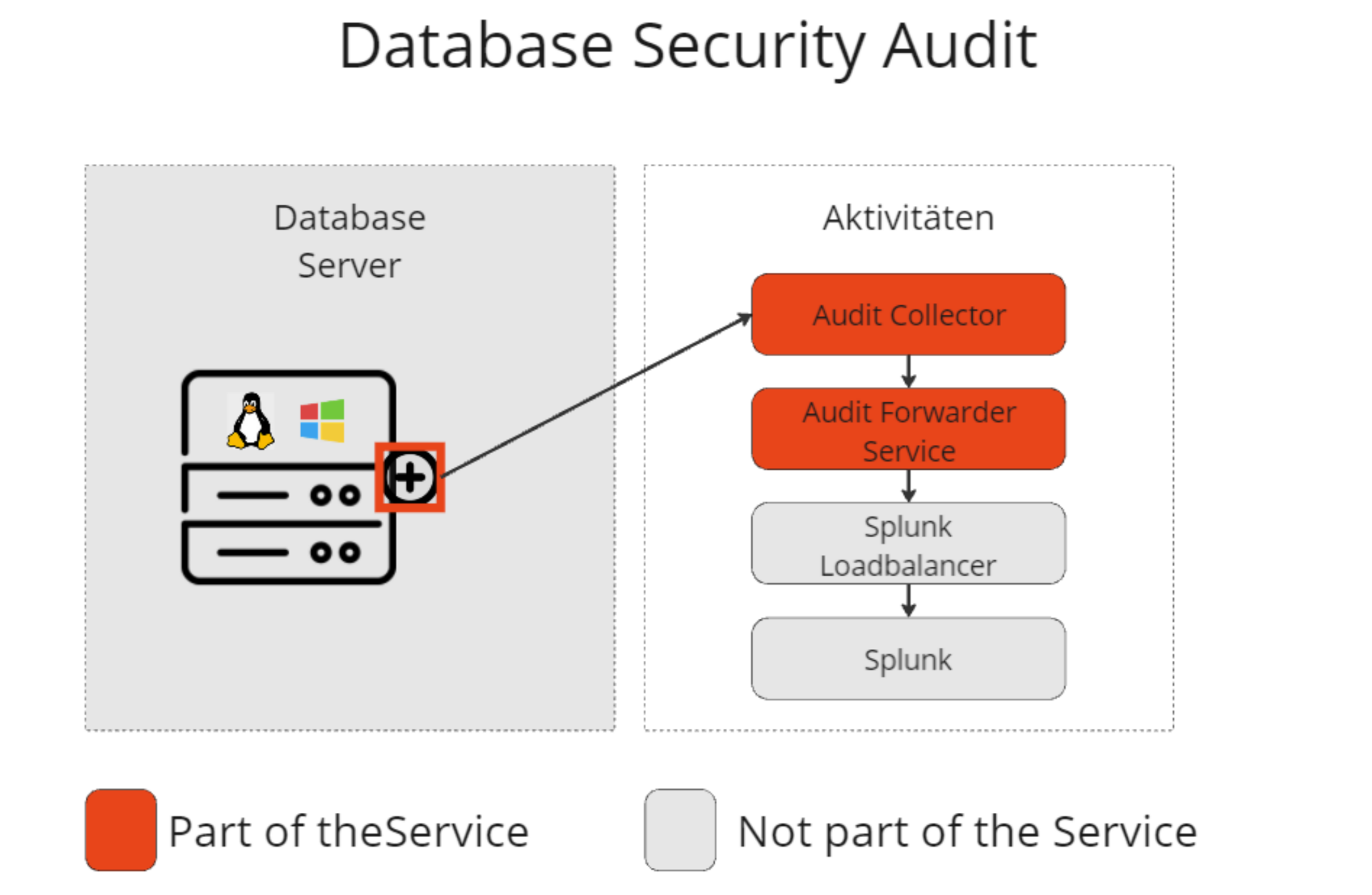
The audits are generated through SQL internal functions and stored on the filesystem. These audits are forwarded to a Splunk load balancer in the customer's tenant.
Service Architecture
Service Scope
Mandatory Database Security Audit
| Security Audit | Description |
|---|---|
| Audit Logins |
- All user successful/failed logins - Logout |
The mandatory security audit is installed by default on every instance and cannot be disabled.
Optional Database Security Audit
| Security Audit | Description |
|---|---|
| Audit Privileges |
- All create/delete/grant/revoke system privileges - All create/delete/grant/revoke database privileges |
| Audit System Settings |
- All audit policy changes - All instance adjustments |
| Audit Activity High Privileged User |
- All DDL actions by users with high privileges including database administrators The audit is performed at top level only on the metadata of the query - All DML actions by users with high privileges including database administrators The audit is performed at top level only on the metadata of the query |
The optional security audit is installed by default on every instance and can be disabled if needed. This will be recorded in the audit upon deactivation and documented in the managed service configuration in the portal.
IT Baseline Protection Database Service
Patch Management
- Patches are deployed every 4 weeks in 3 waves
- Systems that cannot be patched automatically are patched manually on a monthly basis. The patching process and all relevant information are documented in Confluence.
- In case of emergency patching, an identified critical vulnerability is patched immediately.
Logging
- The systems are logged through our monitoring, including event logs, logins, and records of administrator accounts.
- Logs are stored online for 90 days; statistics are retained for 360 days.
- Monitoring ensures that logs are recorded continuously. In case of failure, a ticket is automatically sent to operations.
Malware Protection
- Malware protection is ensured through protection via the operating system.