System Management Services
For IT organizations to meet the demands of resilient infrastructure environments, from provisioning to operation, a series of security and monitoring activities are necessary in addition to the pure provisioning of a virtual machine (VM).
The System Management Services support customers in managing VMs and applications resiliently and scalably at the infrastructure level. The Application Owner can thus use a standard tool set and concentrate entirely on fulfilling their core elements, the management of their business applications.
The following table lists the individual services that support controlling and managing servers and workloads in ix.Cloud.
| Service Name | Service Short Description |
|---|---|
| Managed OS | Increases the security and availability of operating systems. |
| Metrics Monitoring | Monitoring of servers, applications, and services to optimize the performance and availability of IT services. |
| Software Deployment | Ensuring a homogeneous and resilient platform thanks to central software management. |
| Software and Release Cycles | Description of software repositories, handling of 3rd party software, and support and release cycles of Linux and Windows operating systems. |
Managed OS
Managed OS is an optional add-on for Virtual Machines (VM) running an Inventx Owned OS. If this add-on is activated on a VM, Inventx performs activities that contribute to increasing the security and availability of the operating system.
Service Architecture
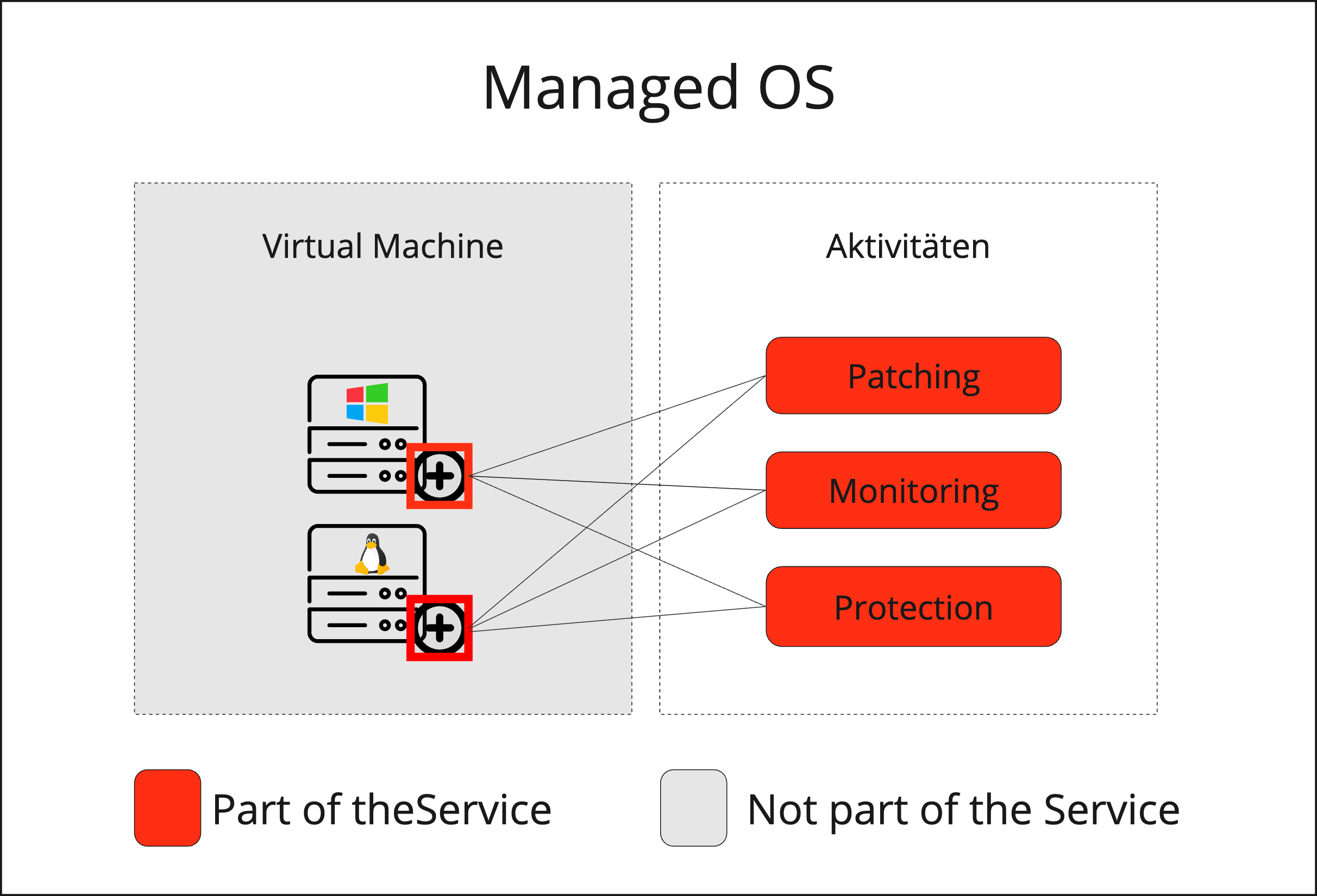
Service Scope
| Features | Windows | Linux |
|---|---|---|
| Patching | ◼ | ◼ |
| Monitoring | ◼ | ◼ |
| Protection | ◼ | ◼ |
Service Options
Patching Addon System Update
Patching serves for the continuous improvement of stability, security, and currency of server operating systems.
The System Update addon includes an automatic update process that takes into account all software updates released by the manufacturer.
| Features | Windows | Linux |
|---|---|---|
| Update Types |
Focus OS without software subsequently installed by the customer, i.e., with IE without frameworks.
|
Focus OS with software packages subsequently installed from RHEL-Repo. |
| Update Frequency | Monthly according to the defined Service Maintenance Window and the patch day configured on the VM. If automatic patching is not desired, there is the "No Automatic Patch" option. | |
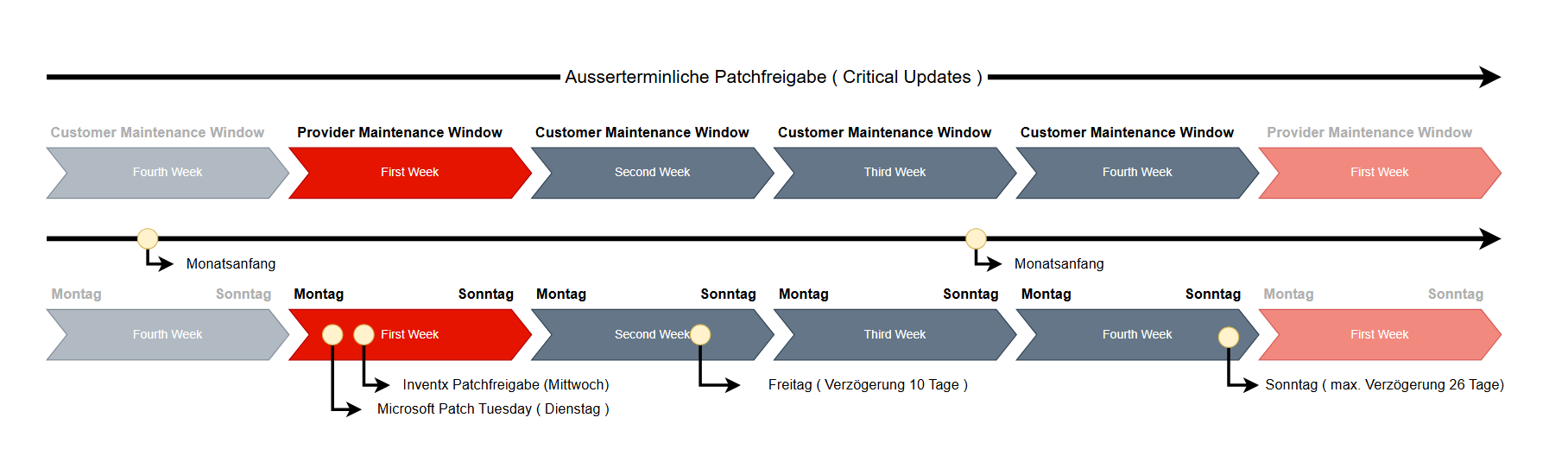
| Update Cycle |
The update process takes place once a month and can be configured flexibly:
|
|
| One Time Update |
Furthermore, the automatic update process can be initiated at any time – even outside regular maintenance windows – via the Cloud Portal using the One Time Update function. The defined time window for this must be at least 30 minutes in the future and have a minimum duration of four hours. |
|
| Updated Products |
|
|
:::info Critical Updates
System Management Services reserves the right to release Critical Updates even outside the scheduled patch release (second Tuesday of the month plus one day).
After an unscheduled patch release, Critical Updates are available to all systems:
- Systems that were already patched between the scheduled and unscheduled patch release can be brought up to date using a One Time Update.
- Systems patched after the unscheduled patch release will gain direct access to the critical updates.
To close security gaps more quickly, Edge Updates are released daily on the WSUS server.
After release, the update is available to the VM without a reboot.
- The update can be installed by the monthly update or a One-Time Update, which leads to a reboot of the VM.
- The update can be installed manually by the user in the OS.
- Alternatively, the standard Scheduled Task can be configured by the VM owner for installation.
Monitoring
Monitoring is the surveillance of processes through systematic collection, measurement, and observation of an operation or process using technical aids. Based on the collected measurements, individual alerts can be set up and notified via a preferred communication channel.
| Monitoring | Windows & Linux |
|---|---|
| Virtual Machine | Active monitoring of performance behavior (CPU/RAM/IOPS) |
| Guest Operating System | Active monitoring and operation of the guest operating system |
| Usage and Performance Behavior | Monitoring and optimizing the usage and performance behavior of all infrastructure components to ensure SLA agreement and propose improvement possibilities |
Protection
Endpoint Protection and Response (EDR)
Endpoint Detection and Response provides advanced threat detections that are near real-time and actionable. Security analysts can effectively prioritize alerts, gain insight into the full scope of a breach, and take response actions to remediate threats.
When a threat is detected, alerts are created in the system, which an analyst can investigate. Alerts associated with the same attack techniques or attacker are grouped into an entity called an incident. Aggregating alerts in this way makes it easier for analysts to collectively investigate and respond to threats.
| Features | Windows & Linux |
|---|---|
| Cloud Protection |
|
| Monitoring | Real-time behavior monitoring. |
| Scanning |
|
| Potentially Unwanted Application (PUA) |
PUA protection is enabled. Potentially unwanted software will be blocked. Detected items are blocked. They will appear in the history along with other threats. |
| Quarantine |
For the following threats
|
| Exclusions |
Exclusions are made in Self-Service via ix.Cloud Portal. Only for Windows servers
|
| Operating Systems in Scope |
|
| Incident Management | Upon detection of a threat, the incident process is ensured by a defined security provider. |
| Reporting | A report is provided by the agreed security provider, identifying the monitored system and detected malware. |
Prerequisites
For Inventx to properly deliver the services defined in this chapter, the following conditions must be met:
| Prerequisite | Windows | Linux |
|---|---|---|
| The VM must be powered on | ✔ | ✔ |
| System components required for the service are exclusively configured by Inventx | Windows Update Agent | ✔ |
| The Azure Subscription required for the EDR service is created and managed by Inventx on the Azure customer tenant | ✔ | ✔ |
| Network targets required for the service are reachable from the VM | ✔ | ✔ |
| Inventx can access the VM over the network | WinRM and RDP | SSH |
| Inventx can access the VM via service accounts with required rights | Administrator rights | Root rights |
| The customer ensures that the disks on the system partition always have sufficient storage space and are not filled by application data and/or application logs | ✔ | ✔ |
| Additional software components that impair components for ensuring the service scope (e.g., proprietary antivirus or firewall software) must not be installed on the systems | ✔ | ✔ |
The customer has administrative rights within the operating system and thus bears full responsibility for the operation of the virtual server if an SLA violation occurs due to incorrect customer action (e.g., operating system update).
Metrics Monitoring
Metrics for business-critical applications collect and analyze data to improve the performance and availability of IT services. The use of metrics enables proactive monitoring, early detection of disruptions, and targeted alarming via defined contact points.
The "Metrics Monitoring" service is based on a highly available, scalable, and performant platform, thereby offering the necessary reliability required of a monitoring platform. Inventx ensures all necessary components related to Metrics Monitoring with this platform service. The customer can thus fully concentrate on monitoring their applications and services.
Billing is per subscription based on active series and the number of active users per month.
Service Architecture

Service Scope
| Features | |
|---|---|
| Monitoring Agent | ◼ |
| Time Series Database | ◼ |
| Query Engine | ◼ |
| Default Metrics & Dashboard | ◼ |
| Custom Metrics & Dashboards | ◼ |
| Custom Alerts & Notifications | ◼ |
| Interfaces to Notification Channels | ◼ |
| Notification Channels | ⁃ |
Service Options
The following chapters explain the individual options of this service in more detail.
Monitoring Agent
The "Monitoring Agent" is responsible for collecting, processing, and then forwarding data to the TSDB for storage. It is software used to monitor the respective system.
Inventx ensures that this component is installed on the defined systems, correctly configured at all times, and that the collection of metrics is guaranteed.
If the installation and/or configuration of the monitoring agent is intentionally or unintentionally changed or damaged by third-party intervention, Inventx can no longer provide the services defined in the service.
Time Series Database
The metrics collected by the Monitoring Agent are written to the Time Series Database (TSDB) and retained for 13 months. The TSDB is optimized for storing and retaining metrics and ensures performant data delivery.
For the Monitoring Agent to send the collected metrics to the TSDB, the IP address 10.94.12.36 and port 443 must be reachable.
Query Engine
The Query Engine provides extensive options for visualizing, analyzing, alerting on, and notifying about metrics from the TSDB via various contact points.
The Query Engine is accessible via the URL https://monitoring.ixcloud.ch and follows the ix.Cloud authorization concept.
Default Metrics & Dashboard
Upon activating the addon, the following user-optimized metrics are activated and written to the TSDB:
- CPU
- Memory
- Harddisk
- Network
- Services
Custom Metrics & Dashboards
In addition to the Default Metrics & Dashboard, custom metrics can be defined and configured. This enables writing customer-specific metrics from applications and services to the TSDB. Using the Query Engine, these metrics can be individually prepared and visualized as desired.
A large number of different plugins are available on Github for agent configuration: https://github.com/influxdata/telegraf/tree/release-1.24/plugins
Custom Alerts & Notifications
Based on the collected metrics, individual alerts can be set up using the Query Engine and notifications sent via a preferred communication channel.
Interfaces to Notification Channels
The Query Engine offers interfaces to the following common tools for notifications:
- E-mail / SMS
- Teams
- Slack
- Webhooks
- Ops-Genie
- Kafka
- Telegram
Notification Channels
Notification channels are not part of the service and must be provided by the customer.
Software Deployment
With the Software Deployment function, the provision and installation of software can be automated and managed from a central location via a portal. Thanks to the central control of software distribution processes, a homogeneous and resilient platform can be ensured.
The standardization of software on servers is a decisive step to ensure the security of the systems while optimizing effort and costs.
This addon is optional and can only be activated on Windows operating systems provided by Inventx. Subsequent deactivation of the addon is not possible.
For Inventx to properly deliver the services defined in the "Managed-OS" addon, the following software must not be distributed by the customer:
- Windows Updates (this includes Windows Security Patches, Windows Feature Updates and Windows Rollup Updates)
- .Net Updates
- Splunk Universal Forwarder
- McAfee Agent
- Zabbix Agent
- Snow Agent
- Telegraf Agent
- Microsoft Defender
- Azure Connected Machine Agent
Service Architecture

Service Scope
| Features | |
|---|---|
| Shared Repository | ◼ |
| Private Repository | ◼ |
| Virus Scan | ◼ |
| Automatic Update | ◼ |
| Scheduled Deployment | ◼ |
Service Options
The following chapters describe the individual options of the Software Deployment addon.
Shared Repository
Through the Shared Repository, Inventx makes selected software packages available across ix.Cloud. The following software packages are made available to all customers via the Shared Repository:
- 7-Zip
- Adobe Reader
- Git
- Google Chrome
- Microsoft Edge
- Mozilla Firefox
- Notepad++
- Postman
- Visual Studio Code
The software packages in the Shared Repository have the Automatic Update option activated.
Private Repository
The Private Repository serves as storage for customer-specific software packages. To store software packages in this repository, either a transfer from the manufacturer's Community Repository or an upload from the local computer can be performed.
When uploading from the local computer, the software packages are scanned for viruses before saving (see Virus Scan).
For software packages from the manufacturer's Community Repository, the Automatic Update option can be activated.
Virus Scan
As protection against malware, software packages are scanned for viruses during upload using a virus scan. If a virus is identified, the user is notified, and the upload is aborted.
Automatic Update
The Automatic Update option can only be activated for software packages originating from the manufacturer's Community Repository. This option cannot be activated for software packages uploaded from the local computer.
Software packages with this option activated are checked weekly on Sunday at 01:00 AM against the manufacturer's Community Repository for newer versions. If newer versions are available, they are automatically downloaded and made available. This has the positive side effect that outdated installations are highlighted in the portal and can be updated with a few clicks.
Scheduled Deployment
A deployment can be scheduled over time. This way, the installation, update, or uninstallation of software can also be carried out at night.
Software and Release Cycles
Linux Software
On Linux systems, the software repositories listed below are essentially integrated via the ManagedOS Addon and considered in the update process. If the EDR Addon is enabled on the VM, Microsoft's Linux Software Repository is also included. Software can be installed from these software repositories on the target system at any time.
| Linux Version | Repos |
|---|---|
| RHEL 8 |
|
| RHEL 9 |
|
| RHEL 10 |
|
| AlmaLinux 8 | BaseOS, Appstream, EPEL* |
| AlmaLinux 9 | BaseOS, Appstream, EPEL* |
* The EPEL repository (Extra Packages for Enterprise Linux) is an additional package repository developed specifically for Enterprise Linux distributions such as Red Hat Enterprise Linux (RHEL), AlmaLinux, and Fedora. It offers a variety of additional open-source packages not included in the standard repositories of these distributions. The EPEL repo is a 3rd Party Software repo, for which the principles of the chapter "Dealing with 3rd Party Software" apply.
Windows Software
In addition to common installation procedures for software on Windows (e.g., with admin rights), the Software Deployment AddOn is available in the Self-Service to install software on a Windows system. The principles of the chapter "Dealing with 3rd Party Software" apply to this software.
Dealing with 3rd Party Software
The following principles apply to dealing with 3rd party software:
With administrator or root rights, it is always possible to install 3rd party software or packages or integrate your own software repositories. For this software, the responsibility, release management, and impact on operations lie entirely with the customer.
If the ManagedOS service is impaired by the use of 3rd party software, the corresponding SLA is no longer valid. In this case, Inventx cannot guarantee the functionality of the 3rd party software or stable ManagedOS operation. In extreme cases, this may lead to the complete affected VM having to be restored from backup by the customer himself or by Inventx on behalf of the customer. Additional expenses incurred by Inventx due to such incidents are not part of Inventx's business services and are to be reimbursed by the customer according to actual effort.
Operating System and Software Release Cycles
Windows and Linux major operating system release cycles are generally designed for 10 years, meaning that during this period, Systems Management Services, including software updates, are provided via the ManagedOS Addon, which the customer can configure for the respective VM via the portal. After these 10 years, the operating system is no longer supported, no new updates are available, and Systems Management Services are no longer developed for this operating system release. The customer is responsible for building a new VM with a newer major operating system release and migrating their application before the end of this 10-year period. In-place upgrades to a newer major operating system release on the same VM are not offered (e.g., from RHEL 9 to RHEL 10 or Windows Server 2022 to Windows Server 2025). If the customer performs an in-place upgrade themselves, they must ensure that all Systems Management Services continue to function properly on the new major operating system release. If the Systems Management Services are impaired by the customer's in-place upgrade to a higher major release, Inventx reserves the right to discontinue these services for the respective VM.
Support beyond these 10 years, e.g., through Extended Lifecycle Support (ELS) for RHEL or Extended Security Updates (ESU) for Windows, is generally not offered. In exceptional cases, this may still occur through special agreements with the customer. However, the conditions described by the manufacturer apply, and it cannot be guaranteed whether the Systems Management Services can still be provided with the same quality. This also entails any additional costs.
In addition to the 10-year major operating system release cycles, RHEL also has Appstream release cycles. This means that various applications in different major versions can be installed via the Appstream repository (e.g., PostgreSQL 13, 15, and 16 or .NET 6, 7, and 8, etc.). The responsibility for this major release management lies with the customer, as they can activate the corresponding channels on the system according to their needs. The update process of the ManagedOS Addon only considers upgrades within the activated major release and not to a higher major release. It should be noted here that Appstream release cycles are often shorter than 10 years compared to the operating system release cycle. The exact details for all release cycles are published by the respective manufacturer.